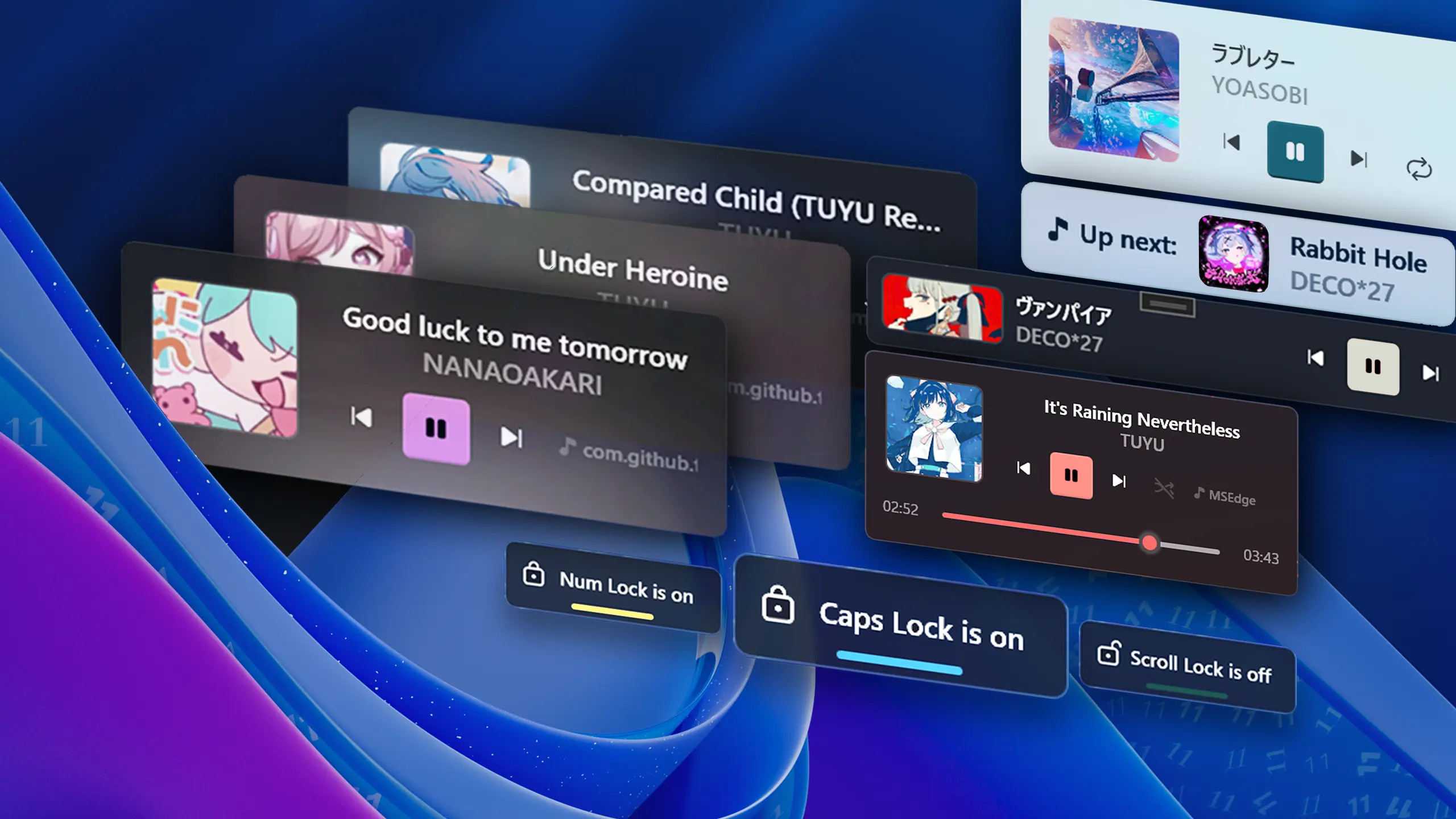
FluentFlyout Background

Changelog

The latest updates and changes to FluentFlyout

Latest Release
Minor Update

Update v2.4.1 - Flyout & Widget Fixes

📝 Changelog

  • Up Next Flyout now displays correctly in all supported languages
  • Lock Flyout now displays correctly in all supported languages
  • Fixed Taskbar Widget hangs/crashes when the native widget was removed by Windows
  • Fixed an issue where media thumbnails load later than other info, leading into situations where the thumbnails might be outdated
  • Improved Up Next Flyout handling under the hood
  • Upon updating, FluentFlyout now sends you a Windows notification to view the changelog (at https://fluentflyout.com/changelog/)
  • The Tray Icon Menu now has a View Logs button for easier log files access
  • Updated app translations (thanks to @oski165, @NimiGames68, @Ste3798, @Aris-Offline, @xsm2, @bropines, @RandomKuchen, @naturbrilian and others on Weblate!)
  • Full Changelog: https://github.com/unchihugo/FluentFlyout/compare/v2.4.0...v2.4.1

❤️ Code Contributors

@DmitriySalnikov, @unchihugo, @xsm2 on GitHub

📦 Free Downloads

Major Update

Update v2.4 - Taskbar Widget Buttons & More

image

📝 Changelog

Taskbar Widget updates:

  • ⏯️ Added a new setting to enable new Taskbar Widget Media Controls buttons
  • 🎨 Added a new setting to enable new subtle animations when a new song shows up
  • The Taskbar Widget will now automatically align next to the native widget if the setting is enabled, enabling support for left-aligned taskbars
  • If the artist name is empty, the title text will now be centered
  • Improved cover alignment
  • Other improvements and optimizations to the widget

Other updates:

  • Added debug/error logging to %AppData%\FluentFlyout\
  • 🎉 Windows 10 compatibility — FluentFlyout will now fully work on Windows 10, expect less visual issues (updated MicaWPF package version to 6.3.2)
  • Updated settings window UI
  • Attempted to fix text overlap issues on the Lock Keys flyouts
  • Updated translations (thanks to @genotypePL, @maksymser, @ysfemreAlbyrk, @Xshadow9, @CC-D-Y, @weiss-rn, @logounet, @Pigeon0v0, @Aris-Offline, @Ste3798, @Nikolai-Misha, @xsm2 and others on Weblate!)
  • Full Changelog: https://github.com/unchihugo/FluentFlyout/compare/2.3.5...v2.4.0

❤️ Code Contributors

@Simnico99, @unchihugo on GitHub

Minor Update

Update v2.3.5 - Taskbar Widget Positioning!

📝 Changelog

  • 🛠️ Taskbar Widget position options: Choose to align the new taskbar widget to the left (default), center or right (next to the tray icon)!
  • 🚀 Media Flyout performance updates: No more lag after rapidly pressing media keys!
  • Fixed issue where the "Launch on Startup" setting would always be switched off
  • Update translations from Hosted Weblate (thanks to @se34k, @CielWhitefox, @thinkii, @v3vishal, @yoyo435, @ThePerson-o, @fortIItude, @xsm2, @weiss-rn and everyone else on Weblate)
  • Refactor licensing for Microsoft Store version
  • Full Changelog: https://github.com/unchihugo/FluentFlyout/compare/v2.3.0...2.3.5

v2.3.6:

❤️ Code Contributors

@unchihugo, @weblate on GitHub

Major Update

Update v2.3 - Windows Taskbar Widget!

FluentFlyoutDemo9

📝 Changelog

  • Media Flyout Taskbar Integration: A compact, built-in widget that lives right on your Windows Taskbar for instant access to your media, with customization options!
  • 📥 Hide Tray Icon option: you can now choose to hide the Tray Icon completely!
  • Fix Media Player Info sometimes displaying Windows Explorer,
  • Pressing the start menu entry (or launching FluentFlyout) a second time will now open settings
  • Add Premium support for Windows Store (still completely free on GitHub)
  • Update translations from Hosted Weblate (thanks to everyone on Weblate),
  • Full Changelog: https://github.com/unchihugo/FluentFlyout/compare/v2.2.0...v2.3.0

❤️ Code Contributors

@kitUIN, @unchihugo, @weblate on GitHub

Major Update

Update v2.2 - QoL and Performance updates

📝 Changelog

  • 🎨 The seek bar on the Media Flyout is now properly accent-colored instead of grey on the progressed side!
  • 💾 Media Flyout now caches the media player name and icon instead of searching on every flyout—you might notice improved performance
  • Added 5 new languages (Arabic, Traditional Chinese, Czech, French, German)
  • Right-to-left languages will now change every window and flyout's UI to follow right-to-left design
  • Update translations from Hosted Weblate (Thanks to @LOGYT-Eberk, @xsm2, @nath89-52, @tnhung2011, @ebraheemelteyb, @Atalanttore, @bropines, @Nikolai-Misha, @CC-D-Y, @Pigeon0v0 and others on Weblate!)
  • Updated READMEs
  • Other bug fixes
  • By @unchihugo
  • Full Changelog: https://github.com/unchihugo/FluentFlyout/compare/v2.1.0...v2.2.0
Major Update

Update v2.1 - Always Display, Player Icons and Names & more Acrylic!

📝 Changelog

  • 📌 Always Display Widget — pin the Media Flyout to your desktop at all times with this new toggle, and dismiss it with a new close button!
  • ✒️ Media Flyout now displays the proper app icon and name from the media player (e.g. Spotify will now display the Spotify icon and name instead of "spotifyab")!
  • 🎨 Added Acrylic Blur toggles to "Next Up" and Lock Keys flyouts so you can have the new look on all flyouts!
  • Added fallback to Chinese and Japanese fonts (MS YaHei and MS JhengHei) to improve appearance and CJK character support
  • Fixed flyout mouse hover issue
  • Settings will now be shown to new users on first launch
  • Update translations from Hosted Weblate (Thanks to @tnhung2011, @Nikolai-Misha, @bropines, @LOGYT-Eberk, @Y-PLONI, @xsm2, @gustavo-bozzano, @ysfemreAlbyrk and others on Weblate!)
  • More bug fixes
  • By @unchihugo
  • Full Changelog: https://github.com/unchihugo/FluentFlyout/compare/v2.0.0...v2.1.0

👏 New Contributors

❤️ Code Contributors

@kitUIN on GitHub

Major Update

Update v2.0 - Acrylic Window, Background Styles & Localization!

🎨 Update 2.0 changes how the Media Flyout looks with two new customization features!

FluentFlyoutDemo7 FluentFlyoutDemo8

📝 Changelog

  • 🎊 Media flyout Acrylic Window toggle — If you think Mica blur feels outdated, upgrade to a sleek Acrylic blur effect for a more modern and native-like experience!
  • 🎨 Blurred Background Styles — Select from three unique background styles, derived from the cover image, for the media flyout! Pair this with Acrylic Window for a sleek and modern aesthetic.
  • Fix flyout appearing on media change bug
  • 🌐 Added Localization — From now on, the UI language will follow your system if it's available! Head over to Weblate to help us with translating!
  • Update README and CONTRIBUTING.md
  • Bug fixes
  • By @unchihugo
  • Full Changelog: https://github.com/unchihugo/FluentFlyout/compare/v1.5.0...v2.0.0

👏 New Contributors

Major Update

Update v1.5.0 - Seek Bar & Lock Keys QoL Update!

This update introduces new QoL features to the Seek Bar and Lock Keys Popups! If the update isn't out for you yet on the Microsoft Store, you can also update it manually (instructions at the 'How to install' section).

🎊 A bunch of thanks to @nopeless for adding all kinds of new features! I'd also like to thank everyone for 50 thousand installs! ❤️

📝 Changelog

👏 New Contributors

❤️ Code Contributors

@Hykerisme, @nopeless, @unchihugo on GitHub

Minor Update

Update v1.4.1 - v1.4.1

This release comprises of QoL changes and bug fixes. It's already live on the Microsoft Store!

📝 Changelog

Minor Update

Update v1.3.4 - v1.3.4

This update introduces a new settings management system that replaces Microsoft's built-in system with a more robust custom system. This will prevent settings from resetting every update or reinstall.

Unfortunately, the settings will reset one last time before converting to the new settings system. After v1.3.4, all settings will migrate to new versions without resetting!

📝 Changelog

❤️ Code Contributors

@unchihugo on GitHub

Minor Update

Update v1.3.1 - QoL updates, more Customization and Bug Fixes

📝 Changelog

  • ✅ Added setting to enable/disable main media player flyout feature by @unchihugo, if you use FluentFlyout for its other flyouts. (Suggested by @havrlisan, u/epicc123)
  • 👏 Added manual light/dark mode theme switcher by @LiAuTraver. (Suggested by @Nex457 and a bunch of others)
  • 🐛 Added new setting to automatically turn off FluentFlyout when a DirectX exclusive fullscreen game is running by @unchihugo, this should fix all edge cases where fullscreen games still minimize after a flyout is activated. (Thanks @Yasunaii and everyone else for helping out!)
  • New, minimal tray icon option by @unchihugo, if you'd like an icon that blends in more with the Windows 11 taskbar icons. (Suggested by u/SuccessfulChest4479, u/Muted_Sentence1279)
  • Added a SongImagePlaceholder icon by @unchihugo, if there's no icon available.
  • Fixed animation off visual bug by @unchihugo. (Thanks, u/ozumando)
  • Added a switch to toggle normal/bold look for the lock flyout by @unchihugo.
  • Full Changelog: https://github.com/unchihugo/FluentFlyout/compare/v1.3.0...v1.3.1

🎉 New Contributors

Major Update

Update v1.3.0 - Introducing the Lock Keys flyout!

📝 Changelog

By @unchihugo:

  • ➡️ Introducing the Lock Keys flyout: the flyout displays the status of your selected lock key at a glance, especially handy for keyboards/laptops without a proper lock key indicator! (suggested by @leviathanaxeislit)
  • ✅ Adjustable easing styles for the flyout animations (suggested by @ottozumkeller)
  • Updated UI and text
  • 👏 Centered thumbnail image on flyouts properly
  • Made Mica effect even more reliable
  • Made "Next Up" flyout more reliable, and solved issues making it display more than once at a time
  • Introduced more languages (CN and NL) to README.md
  • Workaround for startup task not changing (MSIX issue)
  • Full Changelog: https://github.com/unchihugo/FluentFlyout/compare/v1.2.3...v1.3.0
Minor Update

Update v1.2.3 - New customization settings and bug fixes

@unchihugo here, I appreciate everyone's support a lot! I'm still working on more flyouts (capslock, numlock, etc.) and the option to disable volume key triggers, as some of you suggested. Here's what's new so far:

📝 Changelog

  • 🐛 Improve flyout focus & topmost behavior to prevent stealing focus in PR https://github.com/unchihugo/FluentFlyout/pull/7, fixing cases of bug #5 happening (thanks @Nex457)
  • Added two new settings:
    • Alter tray icon left click behavior: choose between opening settings (default) and showing main flyout, if you would like to use the tray icon as a more integrated flyout button in the taskbar (suggestion by u/moccatune)
    • Choose between left or center title & artist alignment. Definitely try this out, it feels very clean! (suggestion by @AsvnDG)
  • Updated settings UI and text
  • Made Mica effect more reliable
  • Other bug fixes
  • Codebase related stuff:
    • Added comments in a lot of areas
    • Created WindowHelper.cs class to have things a bit more organized
  • Full Changelog: https://github.com/unchihugo/FluentFlyout/compare/v1.2.2...v1.2.3
  • tested on Windows 11, common use cases

📦 If you've installed the Microsoft Store version, you can update FluentFlyout using the .msixbundle installer as they're interchangeably compatible. It might take a few more days for the update to appear on MS Store.
➡️ .msixbundle tutorial

Please try out these new features and let me know if you encounter any issues! 💖

Minor Update

Update v1.2.2 - Added "Up Next" flyout and more customization!

FluentFlyoutDemo4

Changelog

  • Added "Up Next" flyout (experimental) that displays what's playing next after each song/video
  • Added images to each section in settings, making it easier to identify which flyout it belongs to
  • Made input boxes smoother and added validation
  • Added option to disable media player info
  • Updated settings and flyout UI and settings text
  • Other bug fixes
  • Full Changelog: https://github.com/unchihugo/FluentFlyout/compare/v1.1.0...v1.2.2
Major Update

Update v1.1.0 - v1.1.0

Public Release Version

Gradually rolling out to Microsoft Store

Changelog

  • Added Repeat One and Repeat All
  • Added Shuffle
  • Made flyout animation speed adjustable
  • Improved settings UI and added scroll
  • Improved Windows 10 compatibility
  • Improved code maintainability
  • Fixed bug where multiple Settings windows could be opened
  • Fixed play/pause visual bug
  • Other bug fixes
  • Full Changelog: https://github.com/unchihugo/FluentFlyout/compare/v1.0.5-alpha...v1.1.0
Minor Update

Update v1.0.5-alpha - alpha

Closed Alpha Release 3

Ironing out/final stages of the project to get it ready to be submitted for certification to Microsoft Store and public launch

Changelog

  • Removed WinForms dependencies, resulting in a package size decrease (~30MB space saved) to ~170MB, once ready
  • Improved Tray UI and functionality
  • Updated flyout and settings UI
  • Fully implemented Light mode
  • Added flyout duration setting
  • Added more flyout positions (top left, top center, top right)
  • Fixed launch on startup option
  • Bug fixes
  • Full Changelog: https://github.com/unchihugo/FluentFlyout/compare/v1.0.2-alpha...v1.0.5-alpha
Minor Update

Update v1.0.0-alpha - alpha

No description provided.